See Which Books from Your Goodreads To-Read List Are on Spotify
January 11, 2026 - Automation, Fun & Games
I've known for a while that Spotify has audiobooks, but I hadn't actually checked it out until recently. While there were plenty of top books to browse through, I found myself flipping back and forth between my long "to read" list in Goodreads and the Spotify search bar, trying to find audiobooks I actually wanted to read.
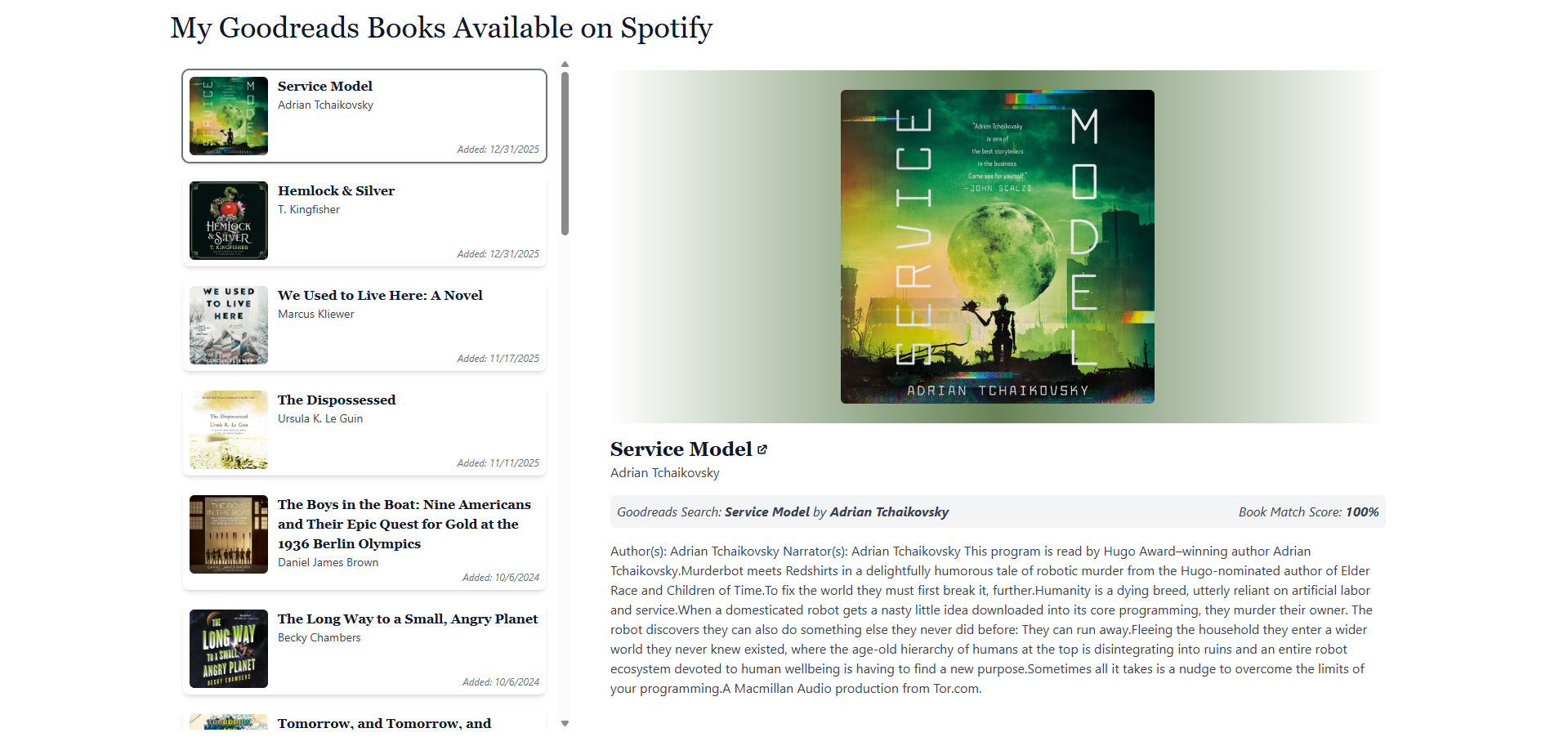
If you're reading this blog post, then you probably already figured out that I decided to build a little script to help me compare my to-read list in Goodreads with Spotify. The script takes a Goodreads export CSV, searches Spotify for each title/author, and outputs a list of matches that can be listened to on Spotify.
If you want to try it out for yourself, the hosted version of it is available here. The app is based on the script I'm about to walk through, but it's a bit more robust (UI, better error handling, etc.). Note that the app is using Spotify's developer mode, so if you hit a rate limit just try again in a minute. In the rest of this post I'll show you my process and how I built the script.
Get and parse the Goodreads data
The first thing I needed to do was get the data from Goodreads. I was thinking I could use their API, but apparently Goodreads' public API was pretty much shut down in 2020. Thankfully, they have a simple export option that lets you download your book lists as a CSV file, and that was enough for this project. Once I had the CSV file, I could start working on the script. For this I used Node.js and the Spotify Web API, but of course you could use any other language you prefer if you want to build your own.
I created a new project folder and initialized it with npm init -y. Then I updated package.json to use ES modules ("type": "module"). Finally, I installed Papa Parse so I could parse the Goodreads CSV export without dealing with CSV weirdness myself: npm install papaparse.
At this point I had a basic Node project ready to go. I created a new script file in the same folder (along with my CSV) and started an async IIFE (Immediately Invoked Function Expression) to load and parse the data.
import fs from "fs";
import Papa from "papaparse";

(async () => {
  const goodreadsExportFileName = "goodreads_export.csv";

  // Read and parse the Goodreads export file
  const goodreadsExportFile = fs.readFileSync(goodreadsExportFileName, "utf8");
  const goodreadsExport = Papa.parse(goodreadsExportFile, {
    header: true,
  }).data;
})();
Great, so at this point we have the parsed data, but I'm not ready to search for each book yet. First, I want to set up where I'm going to store the Spotify results.
After parsing the CSV, I'll dump the processed data into a JSON file. I'll define the filename up front, check if it exists, and create it if it doesn't. Later, when I'm fetching data from Spotify, I'll write to this file after every fetch just in case the API errors out or I hit a limit on my developer app. At this point I'm also going to read that processed books file so I can see which books were already found, and skip them later.
import fs from "fs";
import Papa from "papaparse";

(async () => {
  const goodreadsExportFileName = "goodreads_export.csv";
  const processedBooksFileName = "output.json";

  // Read and parse the Goodreads export file
  const goodreadsExportFile = fs.readFileSync(goodreadsExportFileName, "utf8");
  const goodreadsExport = Papa.parse(goodreadsExportFile, {
    header: true,
  }).data;

  // Create the processed books file if it doesn't exist
  if (!fs.existsSync(processedBooksFileName)) {
    fs.writeFileSync(processedBooksFileName, JSON.stringify({}, null, 2));
  }

  // Read the books that have already been processed
  let processedBooks = {};
  if (fs.existsSync(processedBooksFileName)) {
    processedBooks = JSON.parse(fs.readFileSync(processedBooksFileName, "utf8"));
  }
})();
Ok next let's get into the CSV a bit. If you take a look at the CSV Goodreads gives you, it has a ton of columns, but we really only need a few:
- Exclusive Shelf: This tells us which shelf the book is on. We'll use this to filter out anything that's not on the "to-read" shelf.
- Book Id: The Goodreads ID for the book. We'll use this to keep track of what books we've already checked.
- Title: The title of the book to look up on Spotify.
- Author: The author of the book to look up on Spotify.
- Date Added: The date the book was added to your to-read list. Not strictly needed for this project, but it's nice to have for sorting by the stuff you added most recently.
In my main function, after loading the already processed books, I'll loop through the Goodreads CSV rows, filter down to just the "to-read" shelf, and extract the fields I actually care about.
(async () => {
  // ...

  // Process the books
  for (const row of goodreadsExport) {
    // Skip if not on the "to-read" shelf
    const shelf = row["Exclusive Shelf"];
    if (shelf !== "to-read") continue;

    // Skip if we've already processed this book
    const bookId = row["Book Id"];
    if (processedBooks[bookId]) continue;

    // Extract the book information we need
    const title = row["Title"];
    const author = row["Author"];
    const dateAdded = row["Date Added"];
    const searchQuery = `${title} ${author}`;
  }
})();
Get an access token from Spotify
Now that we have the book information, we can start searching Spotify for it. To use Spotify's API you'll need to create an app in the Spotify Developer Dashboard. Once that's set up, you'll get a client ID and client secret to use in requests. I won't go into the details of how to create an app here, but you can find more information in the Spotify Developer Documentation
The first thing I'm going to do is create a separate function to grab an access token from Spotify. For this project I used the Client Credentials Flow, since it doesn't require logging in as a user. That makes it a perfect fit for a script that's just doing searches of their catalog.
async function getSpotifyAccessToken() {
  try {
    const spotifyClientKey = "<Your Spotify Client Key>";
    const spotifyClientSecret = "<Your Spotify Client Secret>";

    const url = "https://accounts.spotify.com/api/token";
    const options = {
      method: "POST",
      headers: {
        Authorization:
          "Basic " +
          new Buffer.from(spotifyClientKey + ":" + spotifyClientSecret).toString("base64"),
        "Content-Type": "application/x-www-form-urlencoded",
        accept: "application/json",
      },
      body: new URLSearchParams({
        grant_type: "client_credentials",
      }),
    };
    const response = await fetch(url, options);
    const data = await response.json();

    return data.access_token;
  } catch (error) {
    console.error("Error getting Spotify access token:", error);
    return null;
  }
}
I can then use this function at the top of my main function to get an access token.
(async () => {
  const goodreadsExportFileName = "goodreads_export.csv";
  const processedBooksFileName = "output.json";
  const spotifyAccessToken = await getSpotifyAccessToken();

  // ...
})();
Search Spotify for audiobooks
We now have an access token from Spotify and can use it to search for books on Spotify using the Search endpoint. This endpoint lets you search for a variety of things, including songs, artists, and albums.
To search for books, we use the q parameter and set it to the title and author of the book. We also need to set the type parameter to audiobook so we're only searching for audiobooks. I also added a market filter to only search for books in the United States (where I live).
From the search results, I grab the first (and likely best) match and parse it to pull out the data I want, like the title, author, description, etc. All of this lives in a new function called searchSpotify.
async function searchSpotify(query, spotifyAccessToken) {
  try {
    const encodedQuery = encodeURIComponent(query);
    const url = `https://api.spotify.com/v1/search?q=${encodedQuery}&type=audiobook&market=US&limit=1`;
    const options = {
      method: "GET",
      headers: {
        Authorization: `Bearer ${spotifyAccessToken}`,
      },
    };

    const response = await fetch(url, options);
    const data = await response.json();

    const result = data.audiobooks.items[0];
    const title = result.name;
    const author = result.authors && result.authors.length > 0 ? result.authors[0].name : null;
    const link = result.external_urls ? result.external_urls.spotify : null;
    const image = result.images && result.images.length > 0 ? result.images[0].url : null;
    const description = result.description;
    const id = result.id;

    return { title, author, link, image, description, id };
  } catch (error) {
    console.error(`Error searching Spotify for "${query}":`, error);
    return null;
  }
}
Calculate similarity
While Spotify does have a ton of audiobooks, it doesn't have everything. And even when it does, there are tons of different versions of the same book out there with slightly varying titles and editions.
To help with this, I'm using the Jaro-Winkler distance algorithm to calculate the similarity between the title and author in Goodreads and the title and author that Spotify returns. Add it to your project with npm install jaro-winkler and make sure to import it at the top of your file.
Then, inside the loop where we're processing books, I search for the current book in Spotify and calculate the similarity between the Goodreads title/author and the Spotify title/author. If the similarity is greater than 0.65, I'll consider it a match and add it to the output file. I found that 0.65 was a good balance between getting enough matches and not getting too many false positives but of course feel free to tweak it to your liking.
One thing to note: I considered separating the Spotify search to run asynchronously across multiple books, but Spotify's default developer mode enforces a rolling 30-second rate limit that I want to avoid hitting.
import fs from "fs";
import Papa from "papaparse";
import distance from "jaro-winkler";

(async () => {
  // ...

  // Process the books
  for (const row of goodreadsExport) {
    // Skip if not on the "to-read" shelf
    const shelf = row["Exclusive Shelf"];
    if (shelf !== "to-read") continue;

    // Skip if we've already processed this book
    const bookId = row["Book Id"];
    if (processedBooks[bookId]) continue;

    // Extract the book information we need
    const title = row["Title"];
    const author = row["Author"];
    const dateAdded = row["Date Added"];
    const searchQuery = `${title} ${author}`;

    try {
      const {
        title: spotifyTitle,
        author: spotifyAuthor,
        link,
        image,
        description,
        id,
      } = await searchSpotify(searchQuery, spotifyAccessToken);
      const titleSimilarity = distance(title, spotifyTitle);
      const authorSimilarity = distance(author, spotifyAuthor);
      const similarity = titleSimilarity * authorSimilarity;

      // Consider it a match if the similarity is greater than 0.65
      if (similarity > 0.65) {
        processedBooks[bookId] = {
          title,
          author,
          spotifyTitle,
          spotifyAuthor,
          link,
          image,
          description,
          similarity,
          dateAdded,
          id,
        };
        fs.writeFileSync(processedBooksFileName, JSON.stringify(processedBooks, null, 2));
      }
    } catch (error) {
      console.error(`Error processing ${title}:`, error);
    }
  }
})();
And that's it! We now have a list of books that are on our to-read list in Goodreads and that are available on Spotify. You can now use this list to help you decide what to read next. Keep in mind the Spotify only gives you a few hours of listening each month so choose wisely! You can find the hosted web app here if you want to try it out for yourself, and here is the full completed script if you want to run it locally:
import fs from "fs";
import Papa from "papaparse";
import distance from "jaro-winkler";

(async () => {
  const goodreadsExportFileName = "goodreads_export.csv";
  const processedBooksFileName = "output.json";
  const spotifyAccessToken = await getSpotifyAccessToken();

  // Read and parse the Goodreads export file
  const goodreadsExportFile = fs.readFileSync(goodreadsExportFileName, "utf8");
  const goodreadsExport = Papa.parse(goodreadsExportFile, {
    header: true,
  }).data;

  // Create the processed books file if it doesn't exist
  if (!fs.existsSync(processedBooksFileName)) {
    fs.writeFileSync(processedBooksFileName, JSON.stringify({}, null, 2));
  }

  // Read the books that have already been processed
  let processedBooks = {};
  if (fs.existsSync(processedBooksFileName)) {
    processedBooks = JSON.parse(fs.readFileSync(processedBooksFileName, "utf8"));
  }

  // Process the books
  for (const row of goodreadsExport) {
    // Skip if not on the "to-read" shelf
    const shelf = row["Exclusive Shelf"];
    if (shelf !== "to-read") continue;

    // Skip if we've already processed this book
    const bookId = row["Book Id"];
    if (processedBooks[bookId]) continue;

    // Extract the book information we need
    const title = row["Title"];
    const author = row["Author"];
    const dateAdded = row["Date Added"];
    const searchQuery = `${title} ${author}`;

    try {
      const {
        title: spotifyTitle,
        author: spotifyAuthor,
        link,
        image,
        description,
        id,
      } = await searchSpotify(searchQuery, spotifyAccessToken);
      const titleSimilarity = distance(title, spotifyTitle);
      const authorSimilarity = distance(author, spotifyAuthor);
      const similarity = titleSimilarity * authorSimilarity;

      // Consider it a match if the similarity is greater than 0.65
      if (similarity > 0.65) {
        processedBooks[bookId] = {
          title,
          author,
          spotifyTitle,
          spotifyAuthor,
          link,
          image,
          description,
          similarity,
          dateAdded,
          id,
        };
        fs.writeFileSync(processedBooksFileName, JSON.stringify(processedBooks, null, 2));
      }
    } catch (error) {
      console.error(`Error processing ${title}:`, error);
    }
  }
})();

async function getSpotifyAccessToken() {
  try {
    const spotifyClientKey = "<Your Spotify Client Key>";
    const spotifyClientSecret = "<Your Spotify Client Secret>";

    const url = "https://accounts.spotify.com/api/token";
    const options = {
      method: "POST",
      headers: {
        Authorization:
          "Basic " +
          new Buffer.from(spotifyClientKey + ":" + spotifyClientSecret).toString("base64"),
        "Content-Type": "application/x-www-form-urlencoded",
        accept: "application/json",
      },
      body: new URLSearchParams({
        grant_type: "client_credentials",
      }),
    };
    const response = await fetch(url, options);

    const data = await response.json();
    return data.access_token;
  } catch (error) {
    console.error("Error getting Spotify access token:", error);
    return null;
  }
}

async function searchSpotify(query, spotifyAccessToken) {
  try {
    const encodedQuery = encodeURIComponent(query);
    const url = `https://api.spotify.com/v1/search?q=${encodedQuery}&type=audiobook&market=US&limit=1`;
    const options = {
      method: "GET",
      headers: {
        Authorization: `Bearer ${spotifyAccessToken}`,
      },
    };

    const response = await fetch(url, options);
    const data = await response.json();

    const result = data.audiobooks.items[0];
    const title = result.name;
    const author = result.authors && result.authors.length > 0 ? result.authors[0].name : null;
    const link = result.external_urls ? result.external_urls.spotify : null;
    const image = result.images && result.images.length > 0 ? result.images[0].url : null;
    const description = result.description;
    const id = result.id;

    return { title, author, link, image, description, id };
  } catch (error) {
    console.error(`Error searching Spotify for "${query}":`, error);
    return null;
  }
}
Subscribe
Sign up to never miss a post!

About Me
Subscribe
Sign up to never miss a post!
Popular Posts
A Quick Tableau Data Source Mapper
July 13, 2021
Spotify Playlist Generator
November 29, 2021Topic Request
Want me to cover a specific topic? Let me know!
Leave a comment